






Key Takeaways
- The xTool M2 Color Craft Laser combines printing, cutting, and engraving into one efficient desktop machine.
- Enjoy precise print-and-cut alignment without manual adjustments, streamlining your creative process.
- Create vibrant, full-color designs across over 300 materials with the xTool M2 Color Craft Laser.
- Ideal for small businesses and hobbyists, this machine caters to diverse crafting needs with ease.
- Safety-certified and user-friendly, the xTool M2 is perfect for educational settings and home studios.
For a long time, makers were forced to choose. You could buy a laser that cuts and engraves, or a printer that adds colour — but rarely one tool that did both well. Running both meant two machines, two software setups, and the constant headache of lining up a print with a cut by hand. The xTool M2 Color Craft Laser sets out to end that compromise. It prints in full colour, cuts cleanly, and engraves with fine detail, all from a single desktop unit and a single workflow.
Whether you sell custom products online, run a craft studio, teach in a maker space, or just love making personalised gifts at home, this machine is designed to take friction out of your day. In this review, we walk through what it does, where it genuinely stands out, the kind of work it unlocks, and who should consider it.
The xTool M2 Color Craft Laser: What Is It?
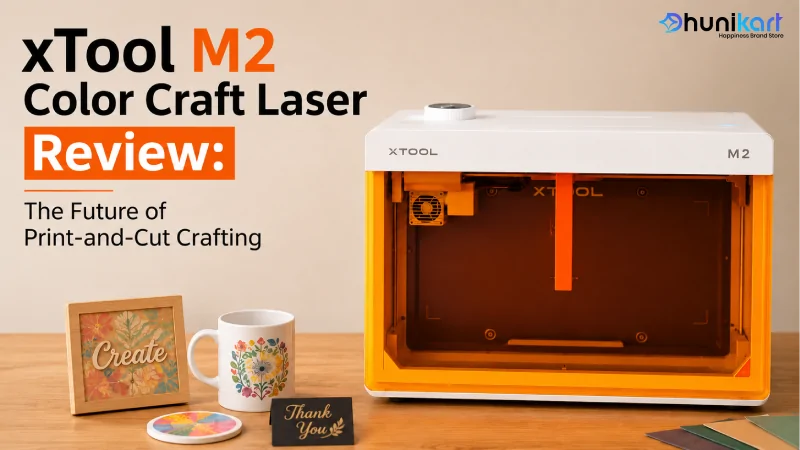
The xTool M2 Color Craft Laser is an all-in-one craft machine that brings three processes together in one enclosed body: laser cutting, laser engraving, and CMYK inkjet printing. The simplest way to picture it is a print-and-cut studio that sits on your desktop. You design once, and the machine prints your artwork in colour, then cuts it out along the exact outline or engraves detail on top — depending on what the project needs.
It arrives pre-assembled, weighs roughly 12.3 kg, and holds Class 1 laser safety certification from TÜV SÜD, which means it stays fully enclosed while running. That safety rating is what makes it comfortable to place in a home studio, a school classroom, or even a retail counter where customers are nearby.
Print, Cut, and Engrave in a Single Workflow
The standout feature is the print-and-cut process. Most entry-level lasers give you only one look — a burnt brown engrave or a frosted etch. The M2 breaks past that. With the CMYK inkjet module, it lays down real colour on stickers, paper, wood, leather, fabric and more, then uses the very same coordinate system to cut or engrave around that printed artwork.
Because printing, cutting, and engraving all share one positioning system, your colour and your cut line genuinely line up. No manual re-alignment, no eyeballing, far less wasted stock. Anyone who has printed something at home and then tried to cut it out by hand knows exactly how much time this saves.
CMYK Printing — Real Colour on Real Materials
The CMYK inkjet module is what separates the M2 from a plain diode laser. It prints across a 300 x 294 mm area and supports a broad spread of surfaces — paper, cardstock, sticker paper, wood, canvas, fabric, felt, leather, and glass.
That single capability opens doors a cut-and-engrave-only machine can never reach. Full-colour stickers, printed wooden coasters, branded packaging, photo-style pieces with a colour base, custom labels, and personalised keepsakes all become possible from one device. For a small business, that translates into more product variety from a single investment, instead of buying separate equipment for each idea.
Cutting and Engraving Performance
On the laser side, the xTool M2 Color Craft Laser is offered in 10W and 20W diode versions, with an optional 3W infrared module for marking metals and certain plastics. Here is how the two main versions perform:
|
Specification |
Detail |
|
Laser power |
10W / 20W blue diode (3W IR optional) |
|
Working area (laser) |
426 x 320 mm |
|
Basswood cutting (one pass) |
8 mm at 10W, 10 mm at 20W |
|
Black acrylic cutting (one pass) |
3 mm at 10W, 8 mm at 20W |
|
Max speed |
600 mm/s |
|
Motion accuracy |
0.01 mm |
|
Rotary engraving diameter |
0–100 mm (with rotary add-on) |
For a desktop diode machine, that cutting depth is impressive. The 20W model slicing 10 mm basswood or 8 mm black acrylic in a single pass means fewer repeat passes and quicker turnaround on orders. Engraving stays crisp thanks to a fine laser spot and a top speed of 600 mm/s, so detailed jobs do not eat up your whole afternoon.
Dual-Camera Positioning and Autofocus
Aligning a design over an oddly shaped object used to be the most annoying part of laser work. The M2 tackles this with two built-in cameras — a 5MP panoramic camera that views the whole bed, and a 2MP close-range camera for precise placement. You set your material anywhere on the bed, see it live on screen, and drop your design exactly where you want it.
Autofocus takes care of the height automatically, so there are no spacers or focus cards to fuss with. Positioning precision reaches around 0.2 mm — and that level of accuracy is exactly what makes the print-and-cut feature reliable, since your colour and your cut line have to sit perfectly over one another.
300+ Materials You Can Work With
xTool rates the M2 for more than 300 materials across its three modes. Here is a quick look at what each mode handles:
- Cuttable: wood, opaque acrylic, paper, cardstock, cardboard, foam, MDF, leather, and felt.
- Engravable: wood, acrylic, leather, stainless steel, aluminium, plated metal, paper, MDF, felt, rubber, glass, plastic, cork, and ceramic.
- Printable: paper, cardstock, sticker paper, wood, canvas, fabric, felt, leather, and glass.
That range covers almost everything a craft seller, gift studio, or classroom would realistically work with — which is the reason the M2 functions as a complete one-machine setup rather than a single-purpose add-on.
Project Ideas You Can Start With
One of the best things about the xTool M2 Color Craft Laser is how quickly it pays for its space on your desk. A few directions makers commonly explore:
- Colour sticker sheets for online stores, printed and cut to shape in one go.
- Personalised wooden coasters and signs with a printed colour design plus an engraved name or date.
- Custom packaging and labels that make a small brand look far more premium.
- Event and wedding stationery — place cards, tags, and favours produced on demand.
- Classroom and STEM projects where students design, print, and cut safely in an enclosed unit.
Because the workflow is the same each time — design, print, cut — you can move from a hobby idea to a sellable product without learning a new process for every material.
Software and Setup
The machine runs on xTool Studio for Windows and macOS, connecting over USB or Wi-Fi. It accepts the everyday design formats — SVG, DXF, JPG, JPEG, PNG, and BMP. Since it ships pre-assembled, most people are running their first real project the same day it arrives. The live camera preview and autofocus keep the learning curve gentle, even if this is your very first laser machine.
Who Is the xTool M2 Color Craft Laser For?
The xTool M2 Color Craft Laser fits a clear group of users. Small business owners who want to sell colour stickers, custom packaging, and personalised goods without buying separate machines. Hobbyists and crafters who want one tool that handles nearly everything. Teachers and maker spaces that need a safe, enclosed, easy-to-use unit. And gift or event sellers who personalise on demand and want true colour, not just a burnt line.
If your work is purely heavy industrial cutting of thick metal sheets, a dedicated fibre or CO2 system may serve you better. But for colour-led craft and product making, this machine lands in a sweet spot that very few competitors reach.
Why Choose Dhunikart
Dhunikart is an authorised dealer and distributor partner for xTool, AlgoLaser, Sculpfun, and Atomstack in India, which means every machine you buy is genuine, warranty-backed, and supported by people who actually understand the products. We are not a faceless marketplace reseller shipping sealed boxes; we work with these machines every day and help buyers land on the right fit for their craft, their materials, and their goals.
Beyond the sale itself, Dhunikart backs you with free shipping across India, the option to book a hands-on product demo before you commit, and a responsive support team you can reach on call or WhatsApp. From your first enquiry to after-sales help with settings and material tests, the aim stays simple — get you making real products quickly, with a machine that earns its place on your desk. That mix of genuine stock and real human support is why makers across India keep choosing Dhunikart.
Conclusion
The xTool M2 Color Craft Laser lives up to its “future of print-and-cut” promise because it truly merges three machines into one. Full-colour CMYK printing, clean diode cutting up to 10 mm, and detailed engraving across 300-plus materials — all aligned by a smart dual-camera system — add up to a tool that grows with you instead of holding you back. For crafters, small businesses, educators, and gift sellers, it removes the daily friction of juggling separate devices. If you have been waiting for one machine that prints colour, cuts, and engraves together, this is it. Order yours today from Dhunikart.
Ready to experience the power of the xTool M2 Color Craft Laser? Contact Dhunikart today for expert assistance, product details, and nationwide delivery. Call us at +91 8866664329 or email support@dhunikart.in to find the perfect laser solution for your creative projects.
Frequently Asked Questions
What can the xTool M2 Color Craft Laser do?
The xTool M2 Color Craft Laser combines laser cutting, engraving, and full-color CMYK printing into one machine. It allows users to create a wide variety of projects using different materials, streamlining the print-and-cut process.
How is the xTool M2 Color Craft Laser different from other machines?
Unlike other machines that only cut or engrave, the xTool M2 Color Craft Laser can print in full color and align cuts and engravings perfectly using a single workflow. This integration not only saves time but also reduces material waste.
What types of materials can I use with the xTool M2 Color Craft Laser?
The xTool M2 can work with over 300 materials including wood, acrylic, leather, fabric, and glass. This versatility makes it suitable for a wide range of craft projects and small business applications.
Is the xTool M2 Color Craft Laser suitable for beginners?
Yes, the xTool M2 Color Craft Laser is designed with beginners in mind. It comes pre-assembled, is user-friendly, and features live camera previews along with autofocus, making it easy for newcomers to complete their first projects.
Where can I buy the xTool M2 Color Craft Laser?
You can purchase the xTool M2 Color Craft Laser from Dhunikart, which is an authorized dealer in India. They offer genuine products, warranty support, and assistance from knowledgeable staff to help you find the right machine for your needs.